 nestjs-doctor
Setup
Quick Start
Run directly with npx:
npx nestjs-doctor@latest .
For file paths and line numbers:
npx nestjs-doctor@latest . --verbose
No configuration or plugins are required.
Installation
Install as a dev dependency for consistent CI runs:
npm install -D nestjs-doctor
CLI Usage
Usage: nestjs-doctor [directory] [options]

  --verbose       Show file paths and line numbers per diagnostic
  --score         Output only the numeric score (for CI)
  --json          JSON output (for tooling)
  --report        Generate an interactive HTML report (--graph also works)
  --min-score <n> Minimum passing score (0-100). Exits with code 1 if below
  --config <p>    Path to config file
  --init          Set up the /nestjs-doctor skill for AI coding agents
  -h, --help      Show help
CI Integration
Use --min-score to enforce a minimum health score in your CI pipeline:
npx nestjs-doctor . --min-score 75
Or add it as a script in package.json:
{
  "scripts": {
    "health": "nestjs-doctor . --min-score 75"
  }
}
Exit Codes
| Code | Meaning |
|---|---|
0 | Score is at or above threshold |
1 | Score is below threshold, or errors were found |
2 | Invalid input (bad path, invalid flags) |
All output modes (--score, --json, default) respect exit codes.
Report
npx nestjs-doctor@latest . --report
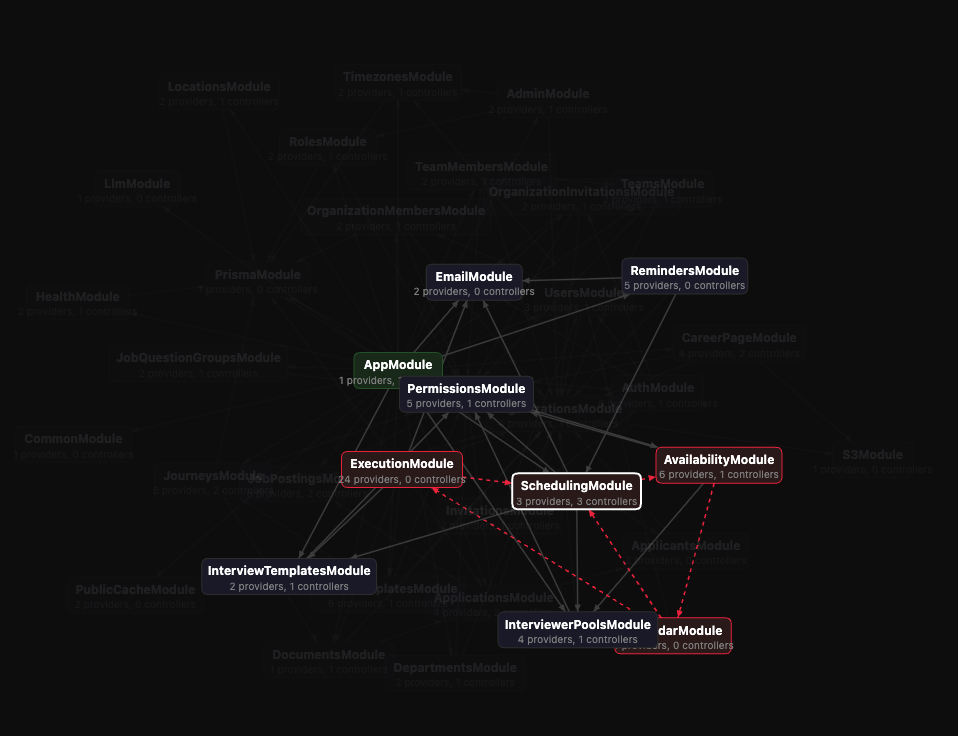
Self-contained HTML file with five sections: score summary, source-level diagnostics with code viewer, interactive module graph, schema ER diagram, and a custom rule playground. Opens in your browser.
AI Coding Agents
Ships with skills for popular AI coding agents. Run --init to auto-detect installed agents and install the nestjs-doctor skill for each one:
npm install -D nestjs-doctor
npx nestjs-doctor --init
| Agent | Detection | Skill location |
|---|---|---|
| Claude Code | ~/.claude exists | ~/.claude/skills/nestjs-doctor/ |
| Amp Code | ~/.amp exists | ~/.config/amp/skills/nestjs-doctor/ |
| Cursor | ~/.cursor exists | ~/.cursor/skills/nestjs-doctor/ |
| OpenCode | opencode CLI or ~/.config/opencode | ~/.config/opencode/skills/nestjs-doctor/ |
| Windsurf | ~/.codeium exists | Appends to ~/.codeium/windsurf/memories/global_rules.md |
| Antigravity | agy CLI or ~/.gemini/antigravity | ~/.gemini/antigravity/skills/nestjs-doctor/ |
| Gemini CLI | gemini CLI or ~/.gemini | ~/.gemini/skills/nestjs-doctor/ |
| Codex | codex CLI or ~/.codex | ~/.codex/skills/nestjs-doctor/ |
A project-level fallback is always written to .agents/nestjs-doctor/. Commit it so every contributor gets the skill automatically.
Skills
--init installs two skills per agent:
| Skill | Command | Description |
|---|---|---|
| nestjs-doctor | /nestjs-doctor | Runs the scan, shows the report, and fixes what it can |
| nestjs-doctor-create-rule | /nestjs-doctor-create-rule | Scaffolds a custom rule: checks feasibility, writes the .ts file, updates config, verifies it loads |
See Custom Rules for the rule format.
Node.js API
nestjs-doctor can be used programmatically:
import { diagnose, diagnoseMonorepo } from "nestjs-doctor";

const result = await diagnose("./my-nestjs-app");
result.score; // { value: 82, label: "Good" }
result.diagnostics; // Diagnostic[]
result.summary; // { total, errors, warnings, info, byCategory }

const mono = await diagnoseMonorepo("./my-monorepo");
mono.isMonorepo; // true
mono.subProjects; // [{ name: "api", result }, ...]
mono.combined; // Merged DiagnoseResult
See the pipeline overview for details on the DiagnoseResult structure.
Incremental Scanning API
For tooling that needs fine-grained control — such as editor integrations and language servers — nestjs-doctor exports an incremental scanning API. Instead of running a full diagnose() call, you can prepare a scan context once and then re-scan individual files as they change.
import {
  prepareAnalysis,
  updateFile,
  checkFile,
  checkAllFiles,
  checkProject,
  updateModuleGraphForFile,
  updateProvidersForFile,
  getRules,
} from "nestjs-doctor";
Lifecycle
// 1. Prepare the analysis context (parses all files, builds module graph, resolves providers)
const { context, customRuleWarnings } = await prepareAnalysis("./my-nestjs-app");

// 2. When a file changes, update it in the context
updateFile(context, "/absolute/path/to/changed-file.ts");

// 3. Re-scan just that file (file-scoped rules only)
const { diagnostics, errors } = checkFile(context, "/absolute/path/to/changed-file.ts");

// 4. Or re-run all file-scoped rules across every file
const allFileResults = checkAllFiles(context);

// 5. Or re-run project-scoped rules (module graph, circular deps, etc.)
const projectResults = checkProject(context);
Granular Updates
If you need to update the module graph or providers independently (for example, after editing multiple files before re-scanning):
updateModuleGraphForFile(context.moduleGraph, context.astProject, filePath);
updateProvidersForFile(context.providers, context.astProject, filePath);
Listing Rules
import { getRules } from "nestjs-doctor";

const rules = getRules(); // all built-in rules (AnyRule[])
AnalysisContext
The prepareAnalysis function returns an AnalysisContext that holds:
| Field | Type | Description |
|---|---|---|
astProject | Project | ts-morph project with all source files |
config | NestjsDoctorConfig | Resolved configuration |
files | string[] | Collected file paths |
fileRules | Rule[] | File-scoped rules (filtered by config) |
projectRules | ProjectRule[] | Project-scoped rules (filtered by config) |
moduleGraph | ModuleGraph | Import/export graph |
providers | Map<string, ProviderInfo> | Resolved NestJS providers |
project | ProjectInfo | Detected project metadata (name, version, ORM, framework) |
schemaGraph | SchemaGraph | undefined | Extracted database schema (if ORM detected) |
schemaRules | SchemaRule[] | Schema-scoped rules (filtered by config) |
targetPath | string | Root directory of the scanned project |